
A FiveWin withdrawal sends money from your wallet to a bank account in your own name. You request it from the Wallet Withdraw page after you log in.
Three things decide whether it goes through smoothly: the name on your bank account, the turnover on any bonus you claimed, and the account details you enter. This guide covers each one, the steps to cash out and what to do if a payout is taking longer than expected.
If you have not deposited yet, the Wallet Withdraw page first shows a short form called Complete before withdrawal. It is the same one-time check as before a deposit: your full name, your bank and your account number of 10 to 16 digits. If you already completed it on the Deposit page, you will not see it again.
The rule that matters most: the name registered on your bank account must match the name on your FiveWin account. A withdrawal to an account in someone else’s name, including a family member’s, will not be approved.
Sign in and open Withdraw. Our FiveWin login guide helps if you cannot sign in.
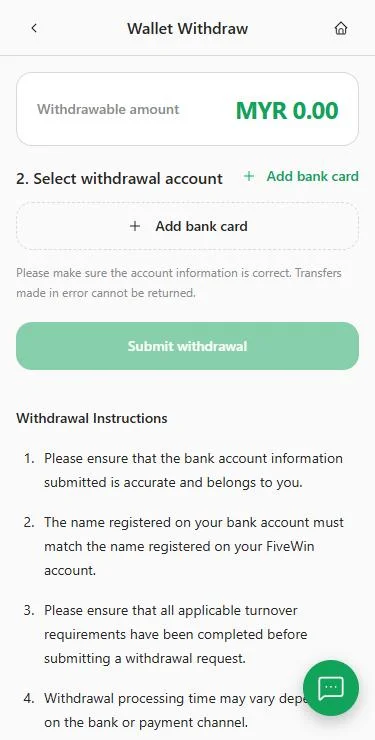
Your withdrawable amount sits at the top of the page.
Select a saved bank account, or Add bank card in your own name.
Enter the amount, check every detail and select Submit withdrawal.
The Withdraw page reminds you that transfers made in error cannot be returned, so check the account number before you submit.
Your wallet balance and your withdrawable amount are not always the same. The most common reason is a bonus: if you claimed a welcome bonus or another promotion, its turnover requirement has to be completed before that money can be withdrawn.
Turnover is the total value of bets you must place, and each promotion sets its own multiple and eligible games. Bets on games outside a bonus’s eligible list do not count. You will find every offer’s terms on the FiveWin promotion page, and worked examples of the turnover each welcome bonus needs on a MYR100 deposit in our bonus turnover guide.
Prefer simple withdrawals? You can play without claiming a bonus, and your deposit then stays free of bonus turnover rules.
These points come from the withdrawal instructions on the FiveWin platform.
There is no single fixed time, because it depends on your bank and the payment channel. Most delays come from one of the points below, so check them before you contact support.
| Situation | What to check |
|---|---|
| Submit withdrawal stays grey | Make sure you have selected a withdrawal account and entered an amount within your withdrawable amount. |
| Withdrawable amount is lower than expected | Check whether a promotion’s turnover is still running. |
| Request submitted but not received | Allow for your bank’s processing time, then contact Live Chat with your username, the amount and the time you submitted it. |
| You added the wrong bank account | Contact Live Chat before you submit a withdrawal to that account. |
| The name on the bank account is different | Withdraw only to an account in your own name that matches your FiveWin account. |
FiveWin Live Chat is open 24/7, and it is also where you check the status of a withdrawal. Our FiveWin customer support page shows how to reach it and what to have ready.
When you want to play again, the FiveWin deposit guide covers every top-up method and its limits. New to FiveWin? Start with the FiveWin register guide.
No. A FiveWin withdrawal can only go to a bank account in your own name that matches your FiveWin account name.
Part of your balance may still be tied to a bonus with turnover left to complete. The withdrawable amount on the Withdraw page shows what you can cash out now.
Contact FiveWin Live Chat, available 24/7, with your username, the amount and the time of your request.
Transfers made in error cannot be returned, so check the account number carefully before you select Submit withdrawal.